🧠 AI Auto-Tuner Guide
Manually tuning SLAM parameters is tedious. The Auto-Tuner uses Bayesian Optimization to find the perfect configuration for your robot.
🌊 How It Works
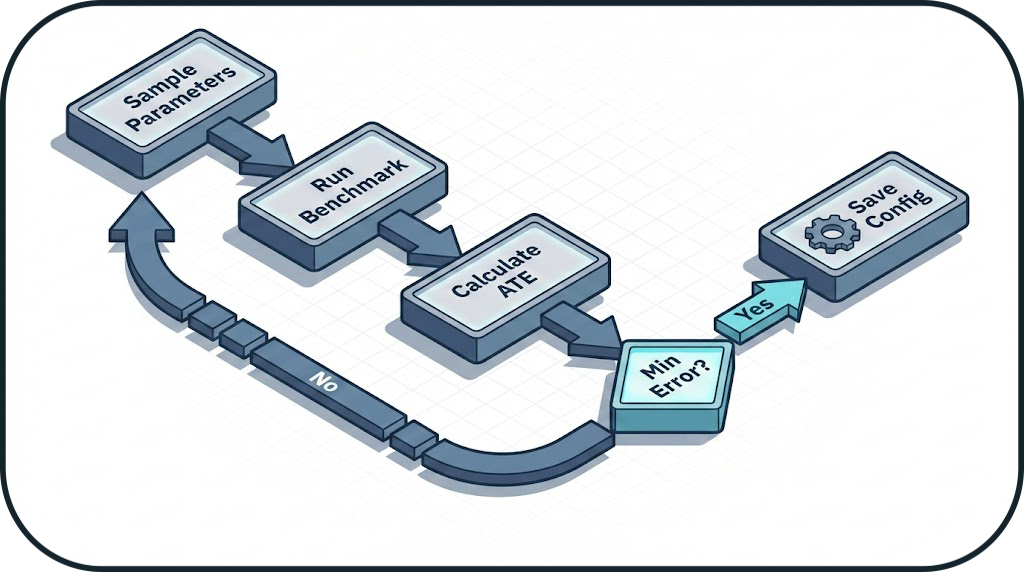
🛠️ Optimization Workflow
1. Define Search Space
Create a file in configs/tuning/ defining the ranges to explore.
# configs/tuning/gmapping_search.yaml
algorithm: gmapping
parameters:
  linearUpdate: [0.1, 0.5]  # Range: 0.1m to 0.5m
  particles: [30, 200]      # Range: 30 to 200
  sigma: [0.05, 0.2]
2. Launch Tuner
From the GUI, go to the Auto-Tuner tab.
- Select Objective:
Minimize ATE(Recommended) orMaximize Coverage. - Budget: Set number of trials (e.g.,
50). - Run: Click Start Optimization.
Time Consumption
Each trial runs a full simulation. 50 trials @ 2 mins/run = 1h 40m total duration. Running in Headless Mode speeds this up significantly.
📈 Analyzing Results
The tuner generates a tuning_report.pdf showing:
- Convergence Plot: How quickly the error dropped.
- Parallel Coordinates: Which parameters matter most.
- Best Config: The winning YAML snippet.